Pepperdoken (![[personal profile]](https://www.dreamwidth.org/img/silk/identity/user.png) pepperdoken) wrote2018-12-04 06:44 pm
pepperdoken) wrote2018-12-04 06:44 pm
pepperdoken) wrote2018-12-04 06:44 pm


Want to use a client to post?
There's a number of clients that can be used to post to dreamwidth. I used to use Semagic back when I was on livejournal, and so when I made a dreamwidth journal I started looking for how to do that. Since most of the guides I found were out of date, here's the settings that work currently:
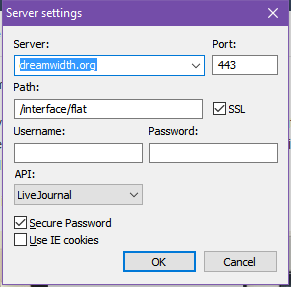
Just enter your username and passwords in the required boxes, and you'll be able to post without using your browser!
Just enter your username and passwords in the required boxes, and you'll be able to post without using your browser!